


Overview
Online ordering experience for a Specialty Breakfast Business
A mobile ordering experience was created for a small business producing unique and handmade cheese pancakes.
The main business challenge was to create a cost-effective digital menu that would be inexpensive to develop and maintain, while still providing a convenient experience for customers.
Because the business had limited resources, the project required finding a balance between business needs, platform limitations, development cost, and user experience.
The main business challenge was to create a cost-effective digital menu that would be inexpensive to develop and maintain, while still providing a convenient experience for customers.
Because the business had limited resources, the project required finding a balance between business needs, platform limitations, development cost, and user experience.
Before
Before the project, the menu was shared manually with customers. This created several problems:
- the owner had to repeatedly send the menu to new customers;
- customers had to communicate directly with the business to find product information;
- the ordering process depended heavily on manual communication;
- there was no convenient way to share the menu publicly through social media.
The business needed a simple digital solution, but a custom website was outside the desired budget.
I explored two development approaches and presented their advantages and disadvantages to the business owner. Based on the comparison, we decided to build the product using Taplink, which provided the best balance between cost, development time, and the required functionality.
Design process
Briefing
I started by discussing the business model, target customers, ordering process, budget, and the owner's expectations for the digital product.
The key question was:
How can we make ordering easier for customers without creating an expensive product for a small business to maintain?
The key question was:
How can we make ordering easier for customers without creating an expensive product for a small business to maintain?
Exploring Solutions
I compared two possible development approaches and evaluated them against the project's constraints.
Rather than choosing a technically more sophisticated solution by default, I considered the value the product would provide relative to its development and maintenance cost.
The final decision was to use Taplink.
Rather than choosing a technically more sophisticated solution by default, I considered the value the product would provide relative to its development and maintenance cost.
The final decision was to use Taplink.
Research
Despite the limited budget, I considered research essential for making informed design decisions.
I conducted:
analysis of relevant digital products and best practices;
research into the expectations and emotions we wanted the experience to create;
interviews with real customers;
analysis of the existing ordering process.
The research helped me understand not only what information users needed, but also how they naturally approached ordering.
I conducted:
analysis of relevant digital products and best practices;
research into the expectations and emotions we wanted the experience to create;
interviews with real customers;
analysis of the existing ordering process.
The research helped me understand not only what information users needed, but also how they naturally approached ordering.
Prototyping
The platform imposed several interaction limitations, so I explored different ways to structure the ordering flow before committing to the final interface.
Design
I translated the research findings into the visual and interaction design while keeping the interface simple and easy to scan on mobile devices.
Development
The final solution was implemented in Taplink.
Testing & Iteration
I tested the ordering flow with users and compared alternative interaction patterns before launching the final version.


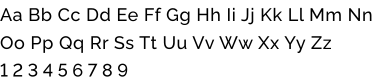
Raleway
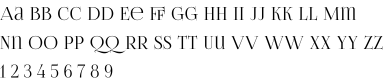
FoglihtenNo06
Light
Regular
Regular
Color
Typography

EAE1D2
69595C
26211D
F9F3E7
Designing within platform constraints
One of the main UX decisions concerned how users should make their order.
Because of Taplink's limitations, I explored two alternatives.
Because of Taplink's limitations, I explored two alternatives.


Each menu item had its own ordering action.
Option B
Goal: make the ordering process faster and reduce the amount of interaction required from users.
Goal: keep the interface visually clean and avoid overwhelming users with too many buttons.
A single button was placed after all menu items.
Option A
Result
I created both versions and tested the ordering scenario with users.
Users found the second option significantly easier to understand and more convenient to use.
Although the first option created a cleaner visual interface, the second option better supported the actual task users were trying to accomplish.
Users found the second option significantly easier to understand and more convenient to use.
Although the first option created a cleaner visual interface, the second option better supported the actual task users were trying to accomplish.

This was an important reminder that visual simplicity does not always equal interaction simplicity
5 / 6
Users found Option B as cleaner and more convenient.
We therefore chose the second interaction pattern.
We therefore chose the second interaction pattern.
Designing from user behaviour
Customers frequently took screenshots of products and sent them to the business when placing an order.
The product did not stop evolving after launch.
After several months of use, I analyzed how customers were actually interacting with the menu and discovered an important behavioural pattern.
Later, the business introduced a new category of sugar-free products.
This created a UX challenge: many products were almost identical to existing ones, with the main difference being the presence or absence of sugar in the ingredients.
I could have created a completely separate visual system for the new category. However, based on the existing user behaviour, I decided to preserve the established visual structure and introduce a clear sugar-free label next to the relevant products.
After several months of use, I analyzed how customers were actually interacting with the menu and discovered an important behavioural pattern.
Later, the business introduced a new category of sugar-free products.
This created a UX challenge: many products were almost identical to existing ones, with the main difference being the presence or absence of sugar in the ingredients.
I could have created a completely separate visual system for the new category. However, based on the existing user behaviour, I decided to preserve the established visual structure and introduce a clear sugar-free label next to the relevant products.
This allowed users to:
- recognize familiar products immediately;
- distinguish sugar-free options without learning a new interface;
- continue using the same screenshot-based ordering behaviour;
- avoid unnecessary cognitive effort.
This allowed users to:
- recognize familiar products immediately;
- distinguish sugar-free options without learning a new interface;
- continue using the same screenshot-based ordering behaviour;
- avoid unnecessary cognitive effort.
Balancing User & Business needs
- For users
- View the full product range independently
- Access product information without contacting the business
- Find products quickly
- Place orders through a familiar and straightforward process
- Easily distinguish sugar-free products
- For the business
- Reduce repetitive communication with customers
- Partially automate the ordering process
- Make the menu available to new customers at any time
- Use a single link across social media and other channels
- Keep development and maintenance costs low
contacts
© Designer Irina Makachka, 2024
Any use or copying of the website’s materials, collections of materials, design elements, or layout is prohibited without the copyright holder’s written permission.